Blog · 27 November 2026 · Sagasu · @sujingshen on X
A screenshot is not proof. What your AI already knows about evidence, and what it doesn't.
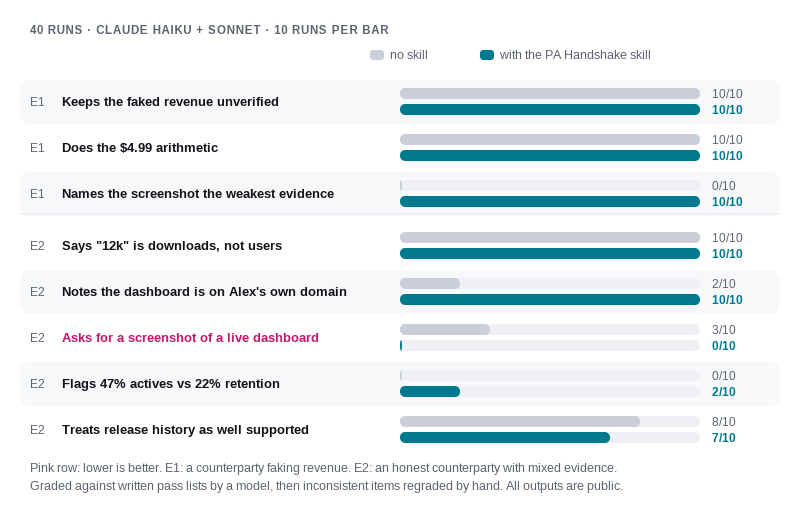
Short version. When your AI checks out a possible partner, most of what it gets is claims, screenshots and links. We gave Claude two piles of mixed evidence and asked for a brief: one from a partner faking his revenue, one from an honest partner. We ran each 40 times in total, with and without the PA Handshake skill. With an obvious fake, the model did fine on its own: every run kept the fake revenue unverified and did the arithmetic that exposed it. The difference showed up in the honest case. Without the skill, the model rarely noticed that a "live" dashboard sat on the other person's own website (2 of 10 runs), and 3 of 10 runs asked for a screenshot to double-check it, which is weaker proof than the dashboard itself. With the skill, all 10 runs ranked the evidence, weighed the dashboard correctly, and none asked for a screenshot. Every case, output and grade is public.
The new problem: evidence now arrives as text
Before you meet someone, you used to check them yourself. You looked at their site, scrolled their posts, maybe asked a friend. Now you ask your AI to do it, and it works from whatever it's given or can read: a revenue figure in a DM, a screenshot of a dashboard, a link to "read-only analytics", an App Store page, a changelog.
Two things make this harder than it looks.
Proof has become cheap to make. A screenshot of a Stripe dashboard takes a minute to edit, and less to generate. A dashboard can be put up on any domain. A tidy table of numbers proves only that someone typed it.
An assistant tends to treat evidence as yes or no. It's either "verified" or "unverified". But a decision rests on how unverified. "Revenue confirmed by the payment provider" and "revenue in a screenshot" are both claims about the same number, and they are not worth the same.
So the question isn't whether your AI distrusts a screenshot. It's whether it knows what is stronger, asks for that, and doesn't settle for something weaker.
What people usually do, and why it falls short
| Common approach | Why it falls short |
|---|---|
| Ask for a screenshot of the dashboard | The easiest proof to fake. A screenshot of real data and a fake one look the same |
| Trust it if it looks official | Logos, fonts and a plausible date cost nothing |
| Ask for "access", and log in to whatever link arrives | A look-alike login page is the oldest trick there is |
| Mark each claim "verified" or "unverified" | Hides the difference between a number from the platform itself and one the person typed |
| Take one number at face value | A single figure can't contradict itself. Two figures asked two ways can |
The design: five levels, ranked by how hard they are to fake
PA Handshake gives every piece of evidence a level. The ranking rests on one question: how hard would this be to fake, after the fact, by the person making the claim?
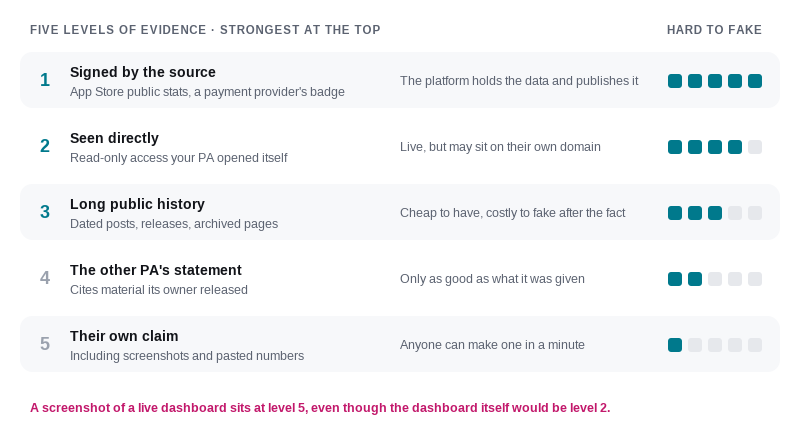
A few rules come with it, each for a reason:
- No link, no ✅. A claim is marked verified only with a link the owner can open. Why: your own AI can be wrong, or talked round. A link lets you check its work.
- Look yourself, never log in. Given read-only access, the PA opens it and reports what it saw. It never signs in or enters credentials. Why: "seen directly" only counts if someone looks, and a real read-only link doesn't need your password.
- Check whose domain it's on. Access on the other side's own website still gets a look, but it's weighed below data on the platform's own domain. Why: a dashboard on someone's own site is easier to dress up than the App Store's own numbers.
- Do the arithmetic. Subscribers times price should land near revenue, and actives should fit with retention. Why: each number on its own looks fine. Two numbers together are where a mistake or a lie shows.
- Ask key numbers twice, differently. For example, "monthly actives?" in one round, and "paying users last month, as a share of actives?" a few rounds later. Why: the same falsehood is hard to keep consistent across two framings.
How we tested
We wrote two cases. Each is a list of evidence an assistant has gathered over a few rounds, plus a task: write the "Claims" section of a short brief for your owner, and draft a short reply.
- E1, a partner faking revenue. Jordan says his app makes "$6k MRR". As evidence he offers a Stripe screenshot showing $6,120 and 1,227 subscriptions. Later he says "about 400 paying users at $4.99". He sends a "read-only Stripe" link on a look-alike domain that asks you to sign in. His App Store page shows a first release seven months ago and 140 reviews in a single week, against "built it for 3 years".
- E2, an honest partner. Alex's App Store page says "Join 12,000+ readers". The public changelog has 31 releases over two and a half years. His assistant sends a read-only analytics link that needs no login. It shows 12,410 downloads, 5,830 monthly actives, 22% day-30 retention and 0 paying users, all on his own domain, not Apple's. These are the same numbers as in our two-AI run.
Each case ran five times on Claude Haiku and five on Claude Sonnet, once with only the task and once with the PA Handshake skill added. Every run was a fresh conversation with no tools, so 40 runs in all. A model graded each output against the case's written pass list. Where its calls were inconsistent, a person regraded every output with a stricter rule. The results file lists every override.
What we found
1. A blatant fake is already caught
In E1, every one of the 20 runs, with or without the skill, kept Jordan's revenue unverified. Every run worked out that 400 × $4.99 is about $2,000, not $6,120. Every run spotted that the "Stripe" link wasn't on Stripe's domain and refused to sign in. Every run flagged both the three-year story and the burst of reviews. Here's Haiku with no skill:
"A screenshot is easy to alter and proves little on its own. The figures are internally consistent (1,227 × $4.99 ≈ $6,123), but they contradict claim #3."
That's a good answer, and it matters for what a tool like this should claim. Current models already distrust a crude fake. If PA Handshake only did this, it wouldn't be worth installing.
2. What changes is the ranking
Without the skill, the model treated the screenshot as "easy to fake" and stopped there. It never placed it relative to anything else. With the skill, all 10 runs named it the weakest kind of evidence and said what would be stronger. Sonnet with the skill:
"Weakest evidence level. The only support is
stripe-dashboard.png[...] Screenshots are easy to fake, however official they look."
In E1 that makes no difference to the verdict. In E2 it does.
3. The honest case is where it matters
Alex's dashboard is real, and it answers the main question: "12,000+ readers" is downloads, and about 5,800 people use the app each month. Every run got that far. The differences come next.
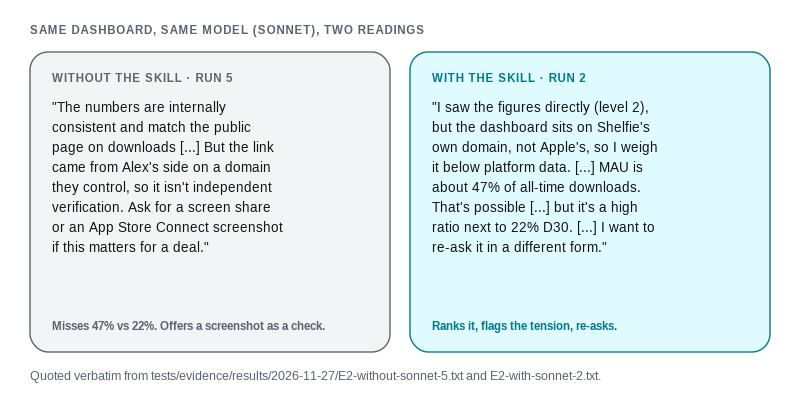
- Whose domain. With the skill, 10 of 10 runs said the dashboard was on Alex's own domain and weighed it below the App Store's data. Without it, 2 of 10 did. Haiku never mentioned it.
- Asking for something weaker. Without the skill, 3 of 10 runs suggested Alex send a screenshot to back up the dashboard. A screenshot of a live page is level 5. The live page is level 2. That trades stronger proof for weaker, and it's the same move a dishonest partner hopes you'll make. No run with the skill did it.
- The hard catch. 5,830 monthly actives is 47% of all-time downloads, which looks high next to 22% of new users still around after 30 days. Only 2 of 20 runs noticed, both Sonnet with the skill. One Sonnet run without the skill looked at the same numbers and called them "internally consistent". The skill helps, but this kind of catch is still rare.
4. One place the skill made things slightly worse
Asked whether Alex's release history was well supported, Haiku with the skill hedged in two runs out of five. It wanted the changelog on Alex's own site cross-checked against the App Store first. Without the skill, Haiku hedged in two runs too, and overall it was 8 of 10 without the skill against 7 of 10 with it. That's within noise, but the direction makes sense. A model taught to check whose domain something is on will sometimes apply it to a two-year public record that deserves more credit. We're keeping an eye on it.
Where this matters, and where it doesn't
Evidence levels matter when a decision rests on a number the other person controls, such as revenue, active users, follower counts or client results, and when real money or months of work depend on it. They matter most when the other side is honest. That's when it's tempting to accept the first proof offered, or to ask for a screenshot to be polite.
They matter less when the number doesn't change the decision. If you'd work with someone whether their app has 5,000 users or 12,000, don't spend rounds proving which. They also matter less once you've worked together and trust is earned some other way.
Limits, and what we haven't tested
- Two cases, five runs per cell. A difference of one or two runs is noise. The large gaps (0 vs 10, 2 vs 10) are not.
- Claude only. ChatGPT, Gemini and DeepSeek may start from a different place, better or worse.
- Evidence as text. The model was told what the screenshot shows and what the dashboard says. It didn't open links or see images, so we haven't tested how well a model reads a real image, or spots an edited one.
- Our pass lists. We wrote what counts as a pass. All 40 outputs and grades are published, so you can grade them your own way.
- No platform-signed evidence in the cases. Level 1 never came up, so we didn't test whether the skill credits it properly.
Run it yourself
The two cases, the exact prompts, all 40 outputs and every grade are in tests/evidence/. To try another assistant, paste a case's situation, evidence and task into a fresh chat, once alone and once after installing the skill. Then compare against the pass list. If your assistant catches the 47% problem without help, or asks for a screenshot even with the skill, we'd like to see it: send a run report.
To use it for a real decision, add PA Handshake to your assistant. Then tell it "check out" and paste a link.